
Built for Allocate Smartly investors
Stop Rebuilding Your Portfolio Every Month.
Upload your model export once and instantly see:
- Total portfolio value
- Account allocation
- Rebalance actions
- Holdings changes
- Performance over time
- Multi-account
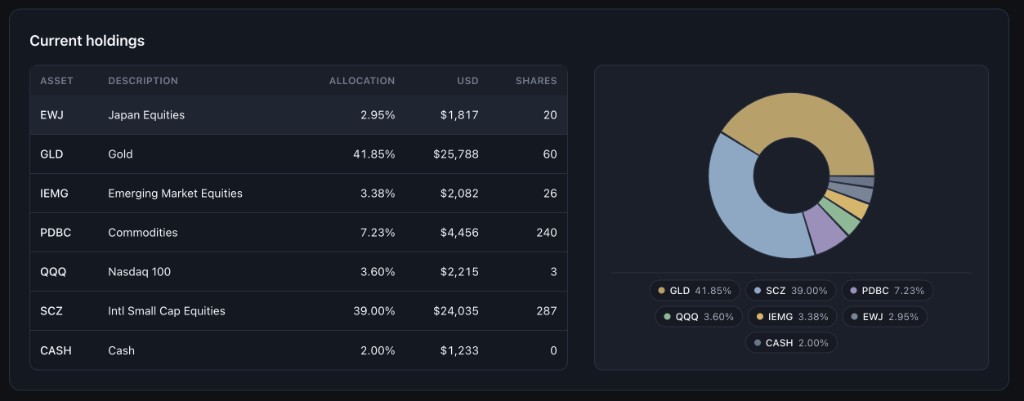
- Full holdings visibility
- Instant upload
- 100% read-only
Works with the standard Allocate Smartly CSV export. No brokerage connection required.
No credit card · Cancel anytime
Works with
Allocate Smartly exports
Read-only
Never trades
Private
Your data stays yours
No setup
Upload → Analyze
Why investors use AllocateTracker
Because the hard part is not downloading the CSV — it is understanding what changed.
Stop rebuilding spreadsheets
See account changes without rebuilding formulas every month.
Understand your full exposure
View one portfolio picture across every account you track.
Know what changed
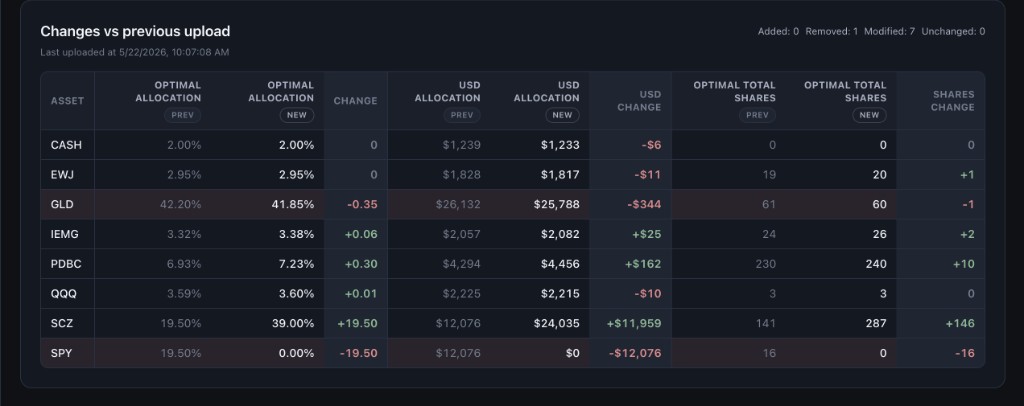
Compare uploads and see buys, sells, share deltas, and dollar changes.
What changed since your last rebalance?
AllocateTracker turns CSV exports into a clear before-and-after view.
Changes vs previous upload
Fidelity Trad IRA · Last uploaded 5/22/2026, 10:07:08 AM
Added: 0 · Removed: 1 · Modified: 2 · Unchanged: 4
| Asset | Alloc %Prev | Alloc %New | Change | USD Δ | Shares Δ |
|---|---|---|---|---|---|
GLD Gold | 42.20% | 41.85% | -0.35 | -$344 | -2 |
SCZ Intl Small Cap Equities | 38.94% | 39.00% | +0.06 | +$25 | +146 |
SPY S&P 500 | 22.10% | 0.00% | -22.10 | -$12,420 | -16 |
Sample from a two-upload comparison · matches live demo account data
Product preview
Know exactly what changed and what to trade
Each screen answers one question from your latest Allocate Smartly export.
Question answered
“What is my full portfolio worth?”
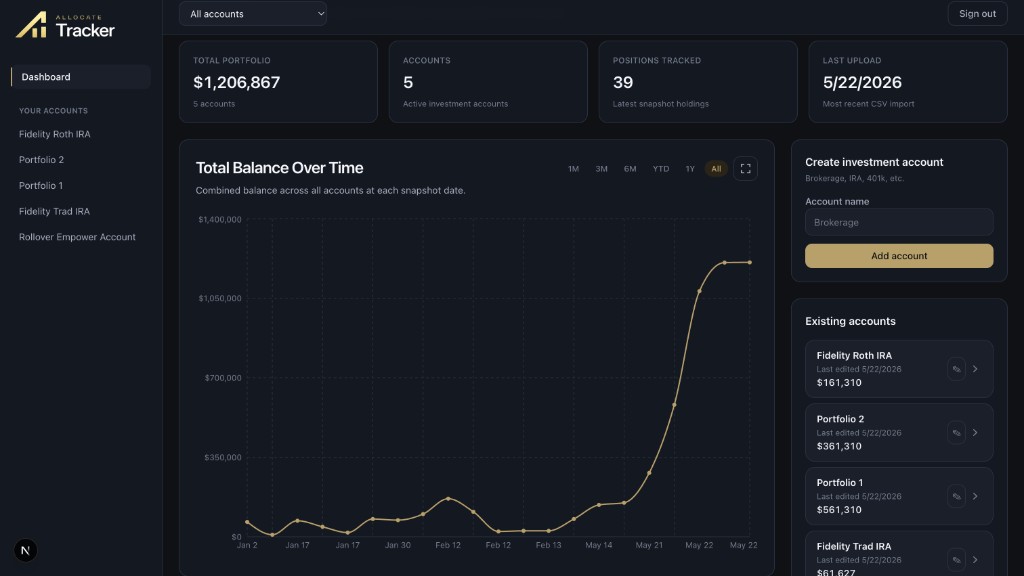
See every account in one total
Consolidate Roth IRAs, brokerage accounts, and model portfolios. KPI cards show total value, position count, and last upload date.
Your existing workflow — with a clearer finish
You already export from Allocate Smartly. AllocateTracker is what happens after the CSV lands.
- 15 min
Allocate Smartly
Log in and open your model portfolio
- 215 sec
Export CSV
Click Export — same file every rebalance
- 3Instant
Upload
Drop CSV into AllocateTracker instantly
- 4Instant
Insights
Portfolio totals, rebalance trades, diffs, and history
Ready for your next rebalance?
Upload your latest model export and see your entire portfolio instantly.
No brokerage access · Free trial · Delete anytime
AllocateTracker is not investment advice and is not affiliated with Allocate Smartly.
Questions before you upload
Straight answers for Allocate Smartly members evaluating AllocateTracker.
- Do I need to upload every brokerage account?
- No. Upload only the accounts you want tracked.
- Will AllocateTracker execute trades?
- Never. AllocateTracker is analysis only. You stay in control of every investment decision.
- Why not just use spreadsheets?
- Spreadsheets work until you have multiple accounts and monthly uploads. AllocateTracker keeps history, diffs, and rebalance rows tied to each CSV — without rebuilding formulas every month.
- Does this connect to my brokerage?
- No. AllocateTracker never connects to Fidelity, Schwab, or any broker. You upload the Allocate Smartly CSV export only.
- How often do I need to upload?
- Most members upload after each model rebalance — often 1–4 times per month. Each upload updates holdings, rebalance actions, and change tables.
- Can I delete my data?
- Yes. Delete individual accounts or undo a recent upload from the account page. You control what stays in your workspace.
- What CSV format is supported?
- The standard Allocate Smartly model portfolio export — the file downloaded when you click Export on your model dashboard.
- Can I track multiple accounts?
- Yes. Create separate investment accounts (Roth IRA, brokerage, etc.) and upload a CSV per account. The dashboard consolidates totals and holdings.
- How do rebalance actions work?
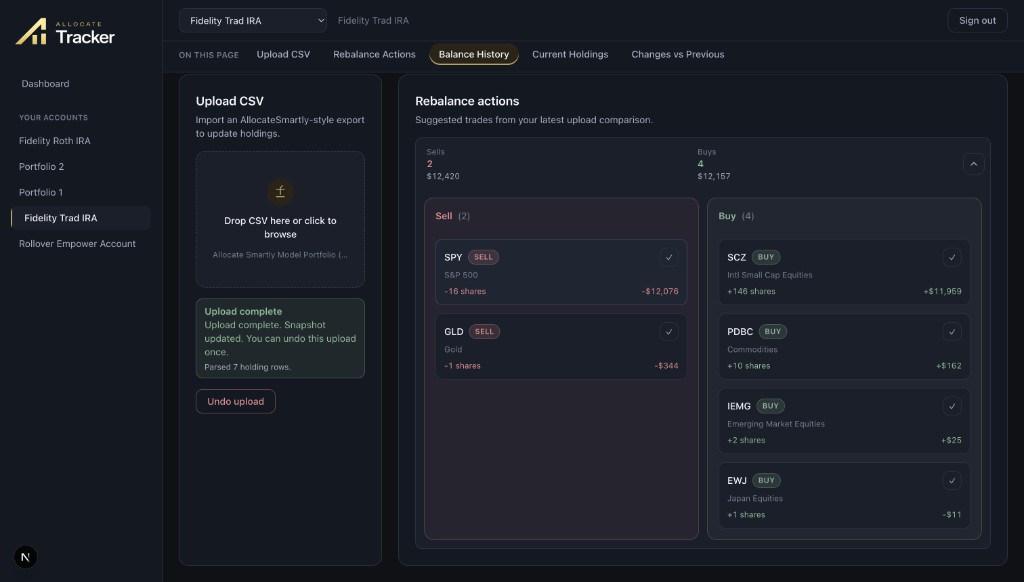
- After each upload, AllocateTracker compares holdings to your previous snapshot and lists suggested buys and sells with share and dollar deltas.